
A Telegram bot can be designed to collect a wide variety of fields depending on your use case (registration, surveys, customer support, lead generation, etc.). Here’s a categorized list of fields you can collect using a Telegram bot:
👤 User Identity
- First name (available by default via Telegram API)
- Last name (if set by the user)
- Telegram username (if set by the user)
- User ID (unique numeric ID – always available)
- Profile photo (can be fetched via API)
📍 Contact & Location
- Phone number (if user shares it via contact request button)
- Email address (must be typed or validated with regex)
- Current location (via location-sharing button)
- Address / City / Country (typed in)
📝 Custom Form Data
- Text input (name, company, feedback, etc.)
- Numeric input (age, budget, quantity, etc.)
- Multiple choice options (inline keyboard buttons or polls)
- Date & time (for bookings, appointments, etc.)
- File uploads (documents, PDFs, resumes, invoices)
- Media uploads (photos, audio, video, voice notes)
💼 Business & Transactional Data
- Order details (items, quantity, delivery preferences)
- Payment confirmation (Telegram supports native payments with providers like Stripe, Razorpay, etc.)
- Subscription choices (plan type, duration)
- Survey responses (ratings, yes/no, multi-select)
⚙️ Behavioral / System Data
- Language preference
- Time zone / preferred contact time
- Referrer or source (campaign link, deep link, QR code)
- Session data (user flow, last step completed)
✅ Important:
Some fields (like phone number, email, or location) require explicit user consent—they must either type it in or click a “share” button. Bots cannot fetch them automatically for privacy reasons.
Telegram Bot Data Capture Plan (Field | How to Collect | Example Use Case)
| Field | How to Collect in Telegram Bot | Example Use Case |
| First Name | Auto-fetched from Telegram API | Identify the user in chat |
| Last Name | Auto-fetched if user set it | Personalization in responses |
| Username | Auto-fetched from Telegram API | Mention/tag user in group |
| User ID | Auto-fetched (unique, always available) | Database key for user tracking |
| Phone Number | Request via “Share Contact” button | OTP verification, lead capture |
| Email Address | User types in; validate with regex | Newsletter signup, receipts |
| Location | Request via “Share Location” button | Service availability check, delivery |
| Address / City | User types in | E-commerce delivery form |
| Age | User types number; validate | Age-based filtering, eligibility check |
| Gender | Provide quick-reply buttons (Male / Female / Other) | Surveys, demographic data |
| Preferred Language | Offer language selection menu | Multilingual support |
| Appointment Date | Ask user to type/select; integrate with date-picker bot plugin | Booking system |
| Preferred Time | Inline buttons (morning / afternoon / evening) | Scheduling calls |
| File Upload | User uploads documents (PDF, DOC, etc.) | Resume collection, KYC docs |
| Photo/Video | User uploads media | ID proof, product feedback |
| Voice Message | User records and sends | Customer feedback, spoken input |
| Survey Answers | Inline keyboard (Yes/No, multiple choice) | Polls, NPS surveys |
| Order Details | Sequential form (items → quantity → confirmation) | Food ordering, e-commerce |
| Payment Info | Use Telegram Payments API | Paid subscriptions, donations |
| Referral Source | Pass via deep link (start parameter) | Track campaign or influencer |
| Session Data | Auto-tracked by storing last step in bot’s DB | Resume incomplete forms |
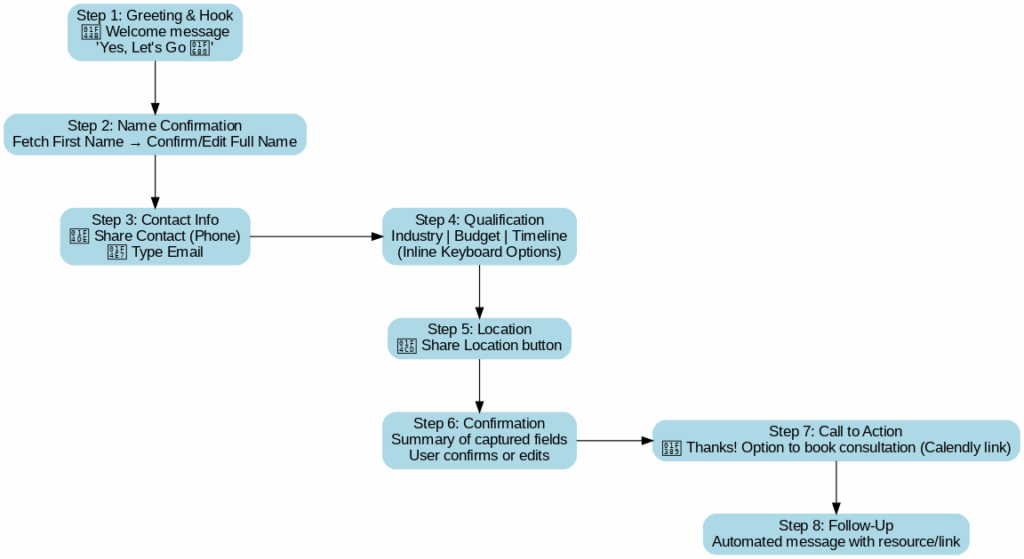
Perfect 👍 Let’s map the Lead Generation Bot Flow step by step.
This template uses the fields we discussed and ensures maximum user engagement while collecting qualified leads.
📲 Lead Generation Bot Flow (Telegram)
Step 1: Greeting & Hook
- Bot message:
“👋 Hi [First Name]! Welcome to [Your Brand]. We help [short value prop].
Can I ask you a few quick questions to help us serve you better?” - User action: Click “Yes, Let’s Go 🚀” (inline button).
Step 2: Name Confirmation
- Bot fetches first name automatically (from Telegram API).
- Bot message:
“I see your name is [First Name]. Do you want us to use this or share your full name?” - User action: Either confirm or type full name.
- Field captured: Full Name.
Step 3: Contact Information
- Bot message:
“📞 Could you share your contact number so we can reach you?” - User action: Press “Share Contact” button.
- Field captured: Phone Number.
- Bot message (next):
“📧 Great! Please type your email address so we can send details.” - User action: Type email.
- Field captured: Email Address.
Step 4: Qualification Questions
- Bot message:
“A few quick questions to understand your needs:” - Industry/Interest
→ Inline keyboard: IT 💻 / Finance 💰 / Education 📚 / Other
→ Field captured: Industry - Budget Range
→ Inline keyboard: < ₹10k / ₹10k–₹50k / ₹50k+
→ Field captured: Budget - Timeline
→ Inline keyboard: “Immediate 🚀” / “1–3 months ⏳” / “Just exploring 👀”
→ Field captured: Timeline
Step 5: Location
- Bot message:
“📍 Please share your location so we can connect you with the right team.” - User action: Tap “Share Location” button.
- Field captured: Location.
Step 6: Confirmation
- Bot message (summary):
“✅ Here’s what we got from you: - Name: [Name]
- Phone: [Phone]
- Email: [Email]
- Industry: [Industry]
- Budget: [Budget]
- Timeline: [Timeline]
- Location: [Location]
Is this correct?”
- User action: Yes / No → If no, edit fields.
Step 7: Call to Action
- Bot message:
“🎉 Thanks [First Name]! Our team will contact you shortly.
Meanwhile, would you like to book a free consultation call?” - User action: Yes → Redirect to Calendly/booking link.
- Data storage: All captured fields are stored in CRM/Google Sheet.
Step 8: Follow-Up
- Send an automated message after a set delay:
“Hi [First Name], here’s a free resource that might help you 👉 [link]”
- Keeps lead warm until sales team reaches out.
Trilokana Marketing develops advanced Telegram Bots with a strong focus on lead generation for B2C brands, particularly in Financial Services, Education, and Consumer Products. By seamlessly integrating Telegram Ads with smart bot flows, we help businesses achieve higher efficiencies, improved engagement, and significantly lower cost per lead.
Are you planning to run Telegram ads, at Trilokana Marketing we can help. Checkout our Manpower Pricing for various services
You can check our Successful Case Study and Blog Articles
Blog Articles
Want to know more about Telegram Ads, Read our latest blog articles on Telegram Advertising.
— Contextual Search Ads Are Now Available in Telegram Ads: A Game-Changer for Marketers – Trilokana Marketing.
— How to get Channel Statistics for Telegram ads – Trilokana Marketing
— Advertising-on-telegram-from-india-a-comprehensive-guide
—What We Learned from a Crypto Display Ad Campaign on CoinMarketCap
—How to Transfer Money to Your Telegram Ads Account from India via TON Wallet
—Top 3 Telegram Ad Spy Tools to Boost Your Campaign Strategy
—8 Telegram Ads Mistakes That Are Costing You Money — And How to Fix Them
—How to Create the Perfect Telegram Channel
—Telegram Hourly Posting Strategy
—Telegram Ads Agency
— Telegram Ads: Understanding the Euro Advertising Cabinet
—How to Generate Car Buyer Leads Using Telegram Ads in India: A Complete Guide
—Why Running Telegram Ads from Your Own Account Is Crucial for Long-Term Growth
—Telegram Mini Apps vs. Bots: Key Differences Explained
—Superprofile vs Rigi: Managing Large Telegram Channels Made Easy
— Telegram Ads Case Study: How We Drove High-Quality Forex Channel Followers at Low CPC
—Telegram Bot Lead Generation Services
—Here’s a categorized list of fields you can collect using a Telegram bot
— Telegram Ads Stars Account: Complete Guide to Setup, Buying Stars, and Running Ads
—Telegram Ads Cabinets in Euros and TON: Targeting Options and Availability